

September 2, 2026
Power BI Application for Adobe Commerce
Turn Your Adobe Commerce Data into Growth: Introducing the Free Power BI App by Decima Digital
If you are running an Adobe Commerce (Magento) store, you already know that data is your most valuable asset.
But let’s be honest: extracting actionable insights from standard Magento reports or spending hours exporting CSVs into static spreadsheets is rarely a good use of your team’s time.
To make enterprise-grade reporting effortless, we built something designed to solve this exact problem.
We are excited to introduce the Magento Power BI App by Decima Digital—a free, turn-key business intelligence tool designed specifically for Adobe Commerce merchants.
Why Power BI for Adobe Commerce?
The Decima Digital Power BI App provides quick, interactive, and visually intuitive analytics on the metrics driving your store:
- Marketing Performance: Get clear visibility into campaign attribution, acquisition channels, and spend efficiency.
- Sales Trends & Revenue Trajectory: Identify revenue patterns, track Average Order Value (AOV), and spot seasonal shifts before they pass.
- Growth Opportunities: Uncover repeat purchase behaviors, top-performing product categories, and untapped customer segments.
- Critical KPIs: Monitor overall store health in a single, consolidated dashboard.
1. Completely Free to Use
There are no hidden fees or tier restrictions for using the app. You get instant access to essential e-commerce dashboards out of the box.
2. Zero Code-Related Modifications
You don't need a team of developers, agency hours, or platform modifications to deploy it. Your storefront codebase remains entirely untouched, ensuring zero risk to your platform stability or speed.
3. Connect in Minutes
Getting started is as simple as generating an API key in your Magento admin panel and pasting it into the app.
How to Get Started Today
Connecting your store takes three simple steps:
- Install: Download the Magento Power BI App by Decima Digital.
- Authenticate: Generate a standard Magento API key from your store’s admin panel.
- Launch: Enter your key into the app parameters to start exploring your live data immediately.
Installing the App
Our app works as a part of Microsoft Power BI and can be installed into your account.
Also, this app requires a Power BI Pro license or higher, as most of the apps from the Microsoft App Store.
- Go to https://app.powerbi.com/
- Open the Apps left menu, and you will see a button Get apps.
- Click it and search for Magento Power BI.
- Or, just go to the https://appsource.microsoft.com/en-us/product/power-bi/decimadigital.magento_powerbi
- Click get it now and install the App
Connecting the App to Magento
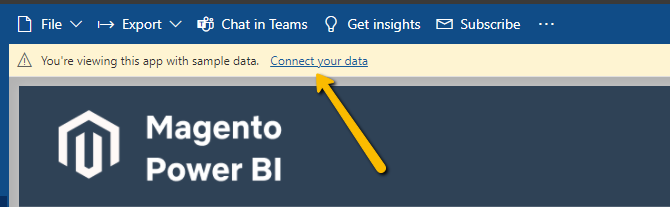
The sample data is included to help learning about the app's functionality, but you need to connect it to your store to use it
Click the link at the top "Connect your data":
- Provide URL to your store without any extra path, just the domain.
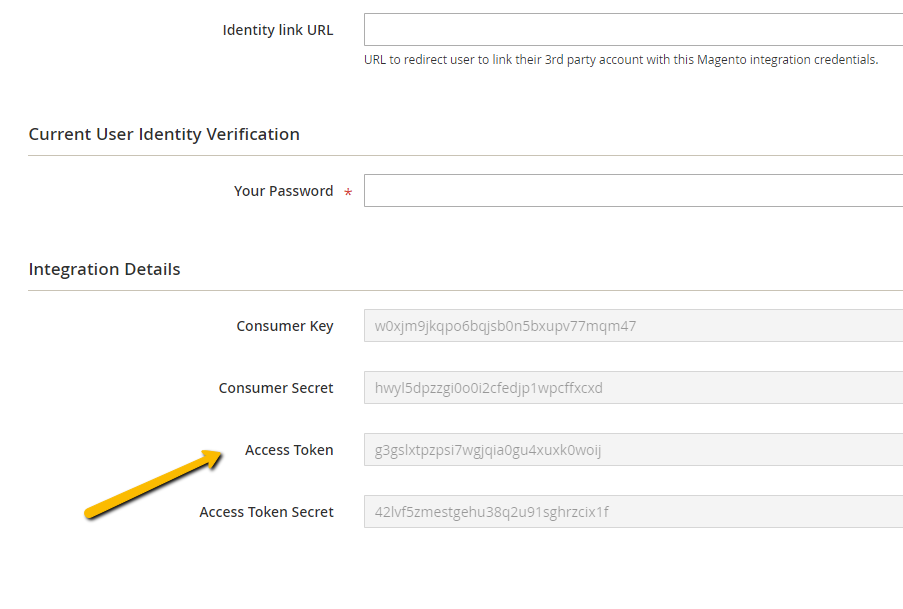
- Add Adobe Commerce Integration ApiKey
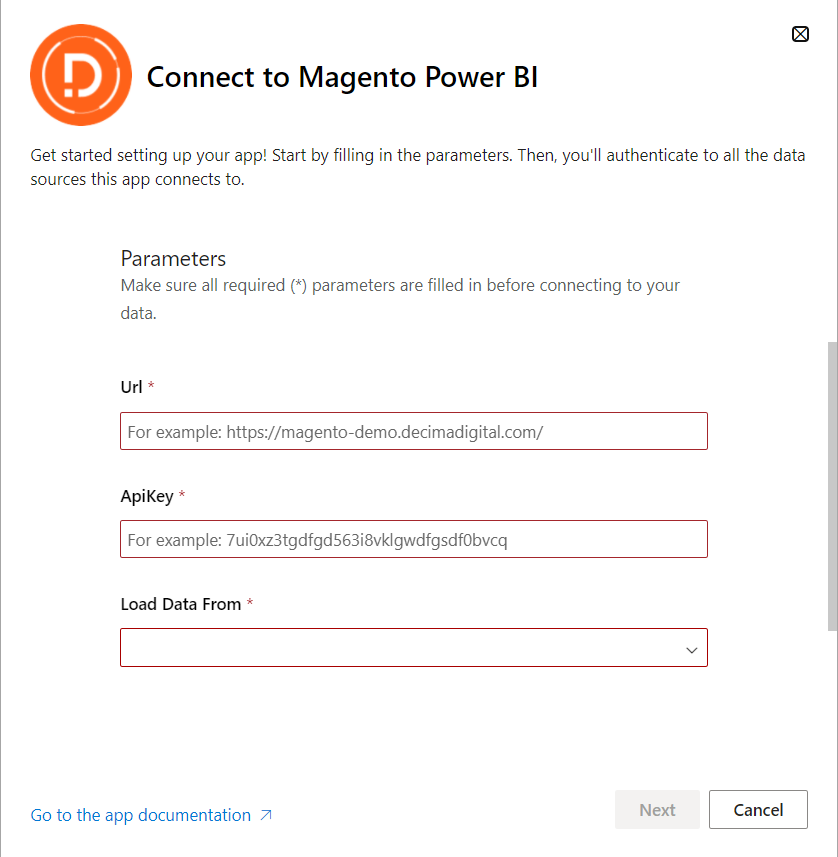
NOTE: The rest of the configuration fields can be left at their default values.
To get an ApiKey you need to do the following:
1. Log in to your Magento Admin
2. Go to the System -> Integrations
3. Click Add New Integration
4. Add integration info: Name, Email, Password
5. API Resources – Select all
6. Once the Integrsation Saved, Adobe Commerce will generate secrets and access tokens.
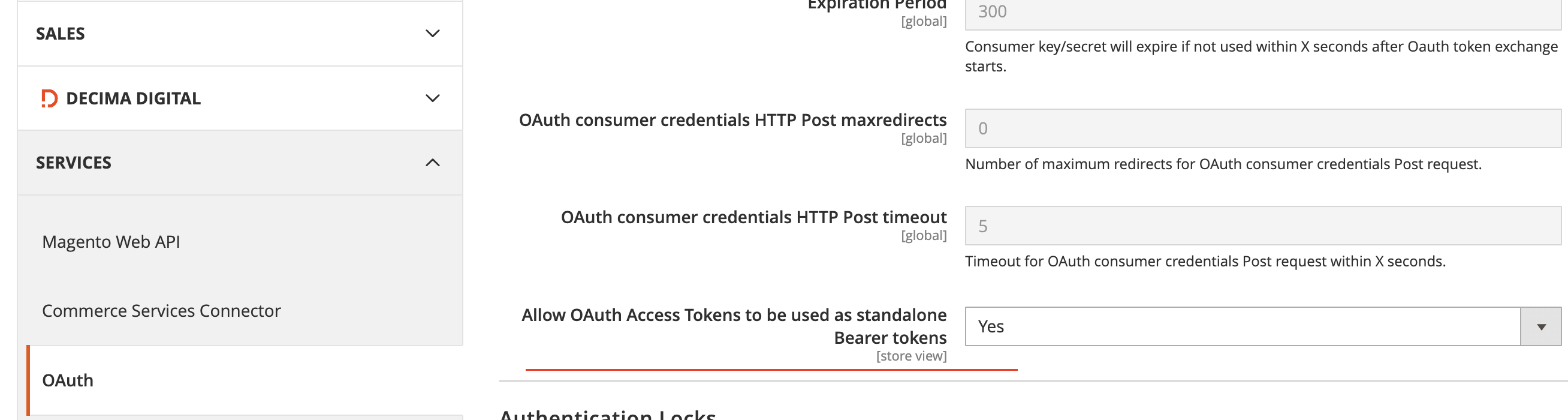
Enable Adobe Commerce capability to connect API via Bearer Token.
1. Log in to your Magento Admin
2. Go to the Stores -> Configuration
3. Set "Allow OAuth Access Tokens to be used as standalone Bearer tokens" to Yes.
IMPORTANT: Please allow some time for the app to import all required data from your store.
Your data is stored securely within your personal Microsoft account for your Power BI user and is never accessible to the Application Vendor.
Power BI enforces a maximum data loading window of 2 hours. If your store has a very high order volume, you may need a custom data upload setup.
Meet the author:
.png)